
Brief Description
General Transit Feed Specification (GTFS) is a digital exchange format for public transport timetables and the associated geographic information, such as stop locations, initiated by Google. It is now distributed by the organisation MobiliyData (https://mobilitydata.org/). There are different implementations of GTFS – we use GTFS Static (GTFS-S; also known as GTFS Schedule) for our timetable dataset.
A GTFS static file contains all public transport in Switzerland in a public transport timetable year (365 days from mid-December). Unlike GTFS Realtime (GTFS-RT), GTFS Static provides only static data, not real-time data. (Timetable year at öv-info.ch)
Access the Data
- https://data.opentransportdata.swiss/de/dataset/timetable-2026-gtfs2020 – Timetable current timetable year (2026)
- https://data.opentransportdata.swiss/dataset/timetable-2027-gtfs2020 – Timetable for next timetable year (2027)
- https://data.opentransportdata.swiss/dataset/timetable-draft-gtfs – Draft timetable
Functional Description
GTFS Static is delivered through a series of text files in ZIP format. The information it contains is extracted from the underlying HDRF file (https://opentransportdata.swiss/cookbook/timetable-cookbook/hafas-rohdaten-format-hrdf/). GTFS can display most, but not all, information from HRDF. This information is delivered by the individual transport companies. Each file provides information on a specific aspect of the transit information, such as stops (stops.txt), lines (routes.txt), trips (trips.txt), transport companies (agency.txt) and other timetable-relevant data. Some information is necessary to provide valid GTFS data, others are optional and provide useful additional information (e.g. timetable changes on specific holidays = calendar_dates.txt).
Due to the widespread distribution of the format, GitHub provides numerous tools for handling GTFS data collected by MobilityData, known as awesome-transit. In addition, opentransportdata.swiss provides specific tools for Swiss data Tools and more (in the section ‘For handling GTFS timetable and real-time data’).
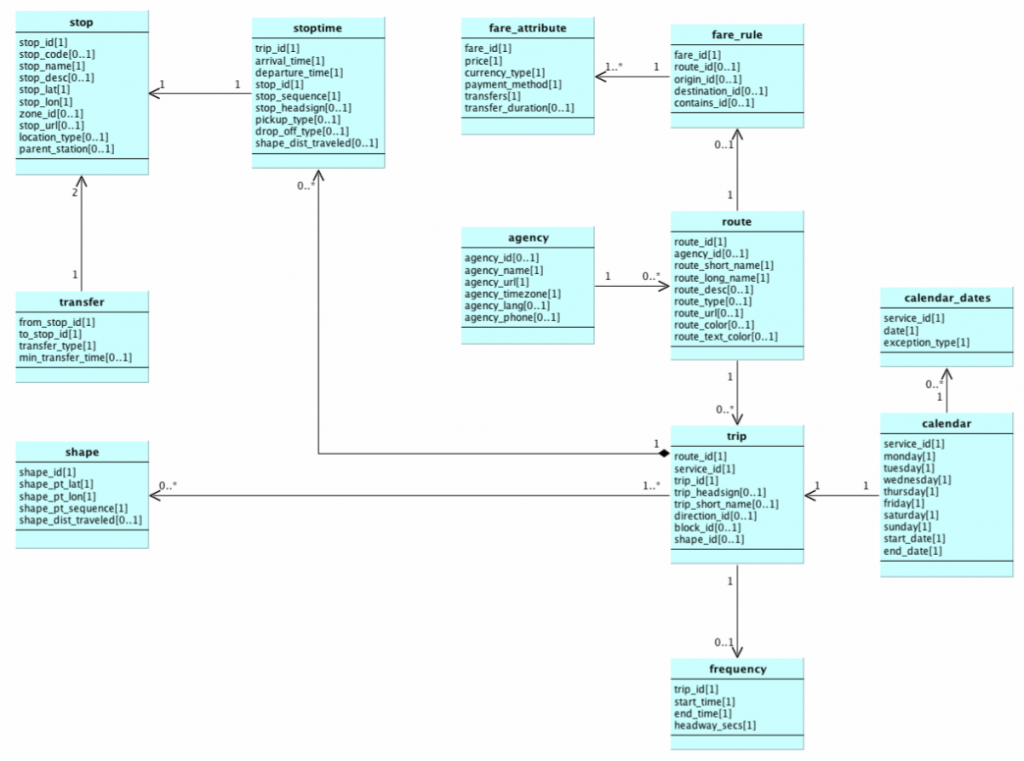
The following graphic shows how the different files included in GTFS are related, although not all are currently covered for the Swiss public transport system:
In addition to GTFS-S, the following GTFS formats are available on opentransportdata.swiss:
- GTFS Realtime (GTFS-RT) with real-time data (e.g. delays)
- GTFS Realtime Service Alerts (GTFS-SA) with incident data (e.g. closure of a stop due to an accident)
- GTFS-Flex for on-demand services (extension of GTFS-S)
Technical Description
Structure of the data
Each file consists of a comma-separated series of text and numbers with fields that together provide the information sought. The first line contains the column names, as is usual for CSV files. The individual fields in the different files are explained in detail on the official website of the GTFS standard: https://gtfs.org/documentation/schedule/reference/
The following files are currently available in our dataset:
- agency.txt
- calendar.txt
- calendar_dates.txt
- feed_info.txt
- routes.txt
- stop_times.txt
- stops.txt
- transfers.txt
- trips.txt
- frequencies.txt (from February 2026)
A summary of the individual files is given below, further details can be found in the Swiss GTFS profile.
agency.txt
The file agency.txt lists all transport companies present in the data set. If the URL cannot be retrieved for a transport company, the agency_url the URL of the SBB transport company.
Example:
agency_id,agency_name,agency_url,agency_timezone,agency_lang,agency_phone
"11","Schweizerische Bundesbahnen SBB","http://www.sbb.ch/","Europe/Berlin","DE","0848 44 66 88"
"65","THURBO","http://www.sbb.ch/","Europe/Berlin","DE",""
"823","Basler Verkehrsbetriebe","http://www.bvb.ch/","Europe/Berlin","DE",""
"37","Baselland Transport","http://blt.ch/","Europe/Berlin","DE",""
"827","Städtische Verkehrsbetriebe Bern","https://bernmobil.ch","Europe/Berlin","DE",""
"78","Sihltal-Zürich-Uetliberg-Bahn","http://szu.ch/","Europe/Berlin","DE",""
"88","Regionalverkehr Berne-Solothurn","http://rbs.ch/","Europe/Berlin","DE",""
calendar.txt
For each service_id, the calendar.txt file defines the days of the week on which this service_id usually runs (e.g. Mon to Fri). start_date and end_date correspond to the entire timetable period from the 1st timetable change to the next timetable change (December to December). ‘1’ indicates that the service_id is running on that day, 0 indicates that it is not running.
In the file ‘trips.txt,’ together with a ‘route_id,’ a ‘service_id’ indicates the days on which a specific trip runs.
Example:
service_id,monday,tuesday,wednesday,thursday,friday,saturday,sunday,start_date,end_date
"TA","1","1","1","1","1","1","1","20251214","20261212"
"TA+00000","1","1","1","1","1","1","1","20251214","20261212"
"TA+00100","1","1","1","1","1","0","0","20251214","20261212"
"TA+01000","0","0","0","0","0","0","1","20251214","20261212"
"TA+01100","0","0","1","0","1","0","0","20251214","20261212"
"TA+02000","1","1","1","1","1","0","0","20251214","20261212"
"TA+02100","0","0","0","0","1","0","0","20251214","20261212"
calendar_dates.txt
The calendar_dates.txt file defines the deviations/exceptions from the weekly pattern as per calendar.txt. These are often public holidays, but there can also be other reasons such as planned construction sites or major events.
exception_type: 1 = also runs on the specified date
exception_type: 2 = not in operation on the given date
service_id,date,exception_type
"TA+00000","20260213","2"
"TA+00000","20260214","2"
"TA+00000","20260215","2"
"TA+00000","20260216","2"
"TA+00000","20260217","2"
"TA+00000","20260218","2"
feed_info.txt
The feed_info.txt file contains metadata about the record. The feed_version column indicates the version of the GTFS dataset that can be referenced by the GTFS Realtime feeds.
Example:
feed_publisher_name,feed_publisher_url,feed_lang,feed_start_date,feed_end_date,feed_version
"SBB","http://www.sbb.ch/","DE","20251214","20261212","20250529"
frequencies.txt
The file frequencies.txt contains the frequency data for frequency trips.
Example:
trip_id,start_time,end_time,headway_secs,exact_times<br>".ojp-93-1Q-Y.1.TA.1.j26","09:15:00","17:15:00","60","0"<br>".ojp-93-1Q-Y.1.TA.2.j26","13:15:00","17:00:00","60","0"<br>".ojp-93-1Q-Y.1.TA.3.j26","08:45:00","17:15:00","60","0"<br>".ojp-93-1Q-Y.1.TA.4.j26","13:15:00","17:15:00","60","0"<br>".ojp-93-1Q-Y.1.TA.5.j26","08:45:00","17:15:00","60","0"<br>".ojp-93-1Q-Y.1.TA.6.j26","09:15:00","11:45:00","60","0"routes.txt
The routes.txt file contains the information about the lines.
The route_id column is structured as follows: <Betriebszweig>-<Liniennummer>-<Projektkurzbezeichnung>-<Linienversionsnummer>; often the line number also contains an extension with an additional hyphen, such as ‘-Y’. However, the content of the individual parts of route_id is largely specific to the system that generates the GTFS data and is not suitable for displaying it to passengers. The route_short_name column contains the line designations relevant to passengers.
Example (S-Bahn lines ‘S10’ operated by different operators in lines 2-4):
route_id,agency_id,route_short_name,route_long_name,route_desc,route_type
"91-10-A-j26-1","78","S10","","S","109"
"91-10-B-j26-1","11","S10","","S","109"
"91-10-C-j26-1","65","S10","","S","109"
"91-29-j26-1","11","S29","","S","109"
"91-29-Y-j26-1","11","IC","","IC","102"
"91-46-j26-1","82","IR46","","IR","103"
"91-48-j26-1","11","RE48","","RE","106"
The route_desc and route_type columns contain the means of transport as shown in the table below. Our data set uses values from this widely distributed list of route_type by way of derogation from the List according to the standard (which only knows ten values for route_type):
| route_desc | DE | FR | IT | EN | route_type |
|---|---|---|---|---|---|
| ASC | Aufzug | Ascenseur | Ascensore | Lift / Elevator | 1303 |
| B | Bus | Autobus | Autobus | Bus | 700 |
| BP | PanoramaBus | Bus panoramique | PanoramaBus | Panorama Bus | 710 |
| BUS | Bus | Autobus | Autobus | Bus | 700 |
| CAR | Fernbus national | Bus longue distance national | Autobus nazionale a lunga percorrenza | National long-distance bus | 202 |
| CAX | Fernbus international | Bus grandes lignes international | Autobus a lunga percorrenza internazionale | International long-distance bus | 201 |
| EB | Eilbus | Bus express | Autobus espresso | Semi fast bus | 702 |
| EXB | Expressbus | Expressbus | Expressbus | Express bus | 702 |
| ICB | InterCity-Bus | Bus InterCity | Autobus InterCity | InterCity Bus | 202 |
| BN | Nacht-Bus | Bus de nuit | Bus notturno | Night Bus | 705 |
| RUB | Rufbus | Bus sur appel | Bus a chiamata | On-demand Bus | 715 |
| TX | Taxi | Taxi | Tassì | Taxi | 1500 |
| SL | Sesselbahn | Télésiège | Seggiovia | Chairlift | 1300 |
| CC | Zahnradbahn | Chemin de fer à crémaillère | Ferrovia a cremagliera | Rack-railroad / Cog Railway | 116 |
| GB | Gondelbahn | Télécabine | Ovovia | Gondola lift | 1300 |
| LB | Luftseilbahn | Téléphérique | Funivia | Cableway / Aerial Ropeway | 1300 |
| PB | Pendelbahn | Téléphérique à mouvement de va-et-vient | Funivia a movimento va e vieni | Aerial Tramway | 1300 |
| M | Metro | Métro | Metropolitana | Underground / Metro | 401 |
| FUN | Standseilbahn | Funiculaire | Funicolare | Funicular | 1400 |
| BAT | Schiff | Bateau | Battello | Ship / Boat | 1000 |
| BAV | Dampfschiff | Bateau à vapeur | Battello a vapore | Steam ship / boat | 1000 |
| FAE | Fähre | Traversier / Ferry | Nave traghetto | Ferry | 1000 |
| KAT | Katamaran | Catamaran | Catamarano | Katamaran | 1000 |
| T | Tram | Tram | Tram | Tram | 900 |
| TN | Nachttram | Tram de nuit | Tram notturno | Night Tram | 900 |
| AIR | Flugzeug | Avion | Velivolo | Airplane | 1100 |
| UUU | Unbekannte Art | Espèce inconnue | Specie sconosciuta | Unknown mode | 1700 |
| AG | Agenturzug | Train de l’agence | Treno d’agenzia | Agency Train | 117 |
| ARZ | Autoreisezug | Train d’autos accompagnées | Treno auto accompagnate | Car-carrying Train | 104 |
| AT | Autotunnelzug | Train-autos Tunnel | Treno per il trasporto di auto in galleria | Auto Tunnel Train | 104 |
| ATZ | Autotunnelzug | Train-autos Tunnel | Treno per il trasporto di auto in galleria | Auto Tunnel Train | 104 |
| E | Eilzug | Train accéléré | Treno espresso | Semi fast / non-stop Train | 103 |
| EC | EuroCity | EuroCity | EuroCity | EuroCity | 102 |
| EN | EuroNight | EuroNight | EuroNight | EuroNight | 105 |
| ES | Eurostar Italia | Eurostar Italia | Eurostar Italia | Eurostar Italia | 101 |
| EST | Eurostar | Eurostar | Eurostar | Eurostar | 101 |
| EXT | Extrazug | Train spécial | Treno speciale | Special Event Train | 117 |
| IC | InterCity | InterCity | InterCity | InterCity | 102 |
| ICE | InterCityExpress | InterCity-Express | InterCityExpress | InterCityExpress | 102 |
| IR | InterRegio | InterRegio | InterRegio | InterRegio | 103 |
| NJ | NightJet | NightJet | Nightjet | NightJet | 105 |
| P | Zug ohne Gewähr | Train non garanti | Treno senza garanzia | Train without Guarantee | 100 |
| PE | PanoramaExpress | PanoramaExpress | PanoramaExpress | PanoramaExpress | 107 |
| R | Regio | Train régional | Regio | Regio | 106 |
| RB | Regionalbahn | Réseau régional | Ferrovia regionale | Regional train | 106 |
| RE | RegioExpress | RegioExpress | RegioExpress | RegioExpress | 106 |
| RJ | Railjet | Railjet | Railjet | Railjet | 102 |
| RJX | Railjet Xpress | Railjet Xpress | Railjet Xpress | Railjet Xpress | 102 |
| S | S-Bahn | RER | Rete celere regionale | Urban Train | 109 |
| SN | Nacht-S-Bahn | RER de nuit | S-Bahn (rete celere regionale) notturna | Night-urban Train | 109 |
| TER | Train Express Regional | Train Express régional | Treno espresso regionale | Train Express Regional | 106 |
| TGV | Train à grande vitesse | Train à grande vitesse | Train à grande vitesse | Train à grande vitesse | 101 |
| ZUG | Zugskategorie unbekannt | Catégorie de train inconnue | Categoria del treno sconosciuta | Train Category Unknown | 100 |
stop_times.txt
The stop_times.txt file defines the arrival and departure times at all stops for each individual trip and is usually by far the largest file of a GTFS-S delivery (it can be larger if shapes.txt is delivered).
Example (complete journey, from Zürich Triemli to Zürich HB):
trip_id,arrival_time,departure_time,stop_id,stop_sequence,pickup_type,drop_off_type
"1.TA.91-10-A-j26-1.1.H","18:27:00","18:27:00","8503054:0:1","1","0","0"
"1.TA.91-10-A-j26-1.1.H","18:28:00","18:28:00","8503053:0:1","2","0","0"
"1.TA.91-10-A-j26-1.1.H","18:29:00","18:29:00","8503052:0:1","3","0","0"
"1.TA.91-10-A-j26-1.1.H","18:32:00","18:32:00","8503051:0:1","4","0","0"
"1.TA.91-10-A-j26-1.1.H","18:35:00","18:35:00","8503090:0:1","5","0","0"
"1.TA.91-10-A-j26-1.1.H","18:37:00","18:37:00","8503000:0:22","6","0","0"
stops.txt
The file stops.txt contains all the stops and – if available – the exact stop or the platform, with any sector information. Since June 2025, the ‘platform_code’ column is also shown, containing the relevant track or stop for a bus or tram. Since October 2025, the Swiss Location ID (SLOID) is also shown in the ‘original_stop_id’ column if available. Since June 2026, the SLOID has also been present in the stop_id, if they are available. Foreign stops and stops without parent or sloid are handled slightly differently. The list below shows the possible examples. The Didok number has also been reinserted.
Behaviour
| Case | stop_id | original_stop_id |
| Unique Platform SLOID | ‘ch:1:sloid:7000:6:32’ | ‘ch:1:sloid:7000:6:32’ |
| Unclear Platform SLOID | ‘ch:1:sloid:7000_gen:ch:1:sloid:7000:0:349752_pf:2A-D’ | ‘ch:1:sloid:7000:0:349752’ |
| Unique SLOID with special characters ‘11/12’ | ‘ch:1:sloid:6206_gen:ch:1:sloid:6206:0:11_pf:11.12’ | ‘ch:1:sloid:6206:0:11’ |
| No Steps SLOID | ‘ch:1:sloid:1102381_gen:missingSLOID_pf:1’ | “’ |
| No Steps SLOID abroad | ‘8029701_gen:missingSLOID_pf:1’ | “’ |
Example:
stop_id,stop_name,stop_lat,stop_lon,location_type,parent_station,platform_code,original_stop_id,didok
"8014228_gen:missingSLOID_pf:12","Karlsruhe Hbf","48.99351443","8.40218540","","Parent8014228","12","","8014228"
"ch:1:sloid:70985:0:313312","Tête-Noire","46.07122854","6.97499597","","Parentch:1:sloid:70985","","ch:1:sloid:70985:0:313312","8570985"
"Parentch:1:sloid:1104927","Weil am Rhein, Kant-Gymnasium","47.59530407","7.61225185","1","","","ch:1:sloid:1104927","1104927"
"ParentmissingSLOID_8302589","Venezia Mestre","45.48190300","12.23190108","1","","","missingSLOID_8302589","8302589"
"ch:1:sloid:3000_gen:ch:1:sloid:3000:501:33_pf:33AB","Zürich HB","47.37852293","8.53675303","","Parentch:1:sloid:3000","33AB","ch:1:sloid:3000:501:33","8503000"
transfers.txt
The transfers.txt file defines rules for changing trains. Typically, the stops involved (from_stop_id and to_stop_id) and the time required to transfer trains (min_transfer_time) are specified with transfer_type=2 (‘normal’ transfer with minimum time requirement according to min_transfer_time).
Transfer_type=4 is set for all through-passages that are separations. transfer_type = 4 according to the GTFS standard means that passengers do not need to change trains. This applies, for example, to coupled trains that split up (journey meetings) and thus change the trip_id but passengers can remain seated; this can be indicated with a corresponding symbol.
In addition, there have been guaranteed connections with transfer_type=1 since October 2025, which means that the next mode of transport is waiting for the passengers changing. The min_transfer_time column remains empty in these cases.
However, on the instructions of the control centre, it may still happen that the outgoing vehicle does not wait.
In Switzerland, the standard transfer time within a stop is set at 2 minutes. This is not apparent from the GTFS file itself but must be taken into account for routing.
Example:
from_stop_id,to_stop_id,from_route_id,to_route_id,from_trip_id,to_trip_id,transfer_type,min_transfer_time
"8501120:0:1","8501120:0:3","","","","","2","300"
"8501120:0:1","8501120:0:4","","","","","2","300"
"8501120:0:1","8501120:0:4A-D","","","","","2","300"
"8501120:0:1","8501120:0:4E-G","","","","","2","300"
"8507483:0:3","8507483:0:3","91-1-N-j26-1","91-1-N-j26-1","72.TA.91-1-N-j26-1.22.R","91.TA.91-1-N-j26-1.34.R","4",""
"8507483:0:3","8507483:0:3","91-1-N-j26-1","91-1-N-j26-1","72.TA.91-1-N-j26-1.22.R","100.TA.91-1-N-j26-1.36.R","4",""
"8507483:0:3","8507483:0:3","91-1-N-j26-1","91-11-N-j26-1","72.TA.91-1-N-j26-1.22.R","24.TA.91-11-N-j26-1.7.R","4",""
"8502282","8502282","92-634-j25-1","92-602-A-j25-1","104.TA.92-634-j25-1.1.H","114.TA.92-602-A-j25-1.1.H","1",""
"8577747","8577747","92-234-j25-1","92-235-A-j25-1","4.TA.92-234-j25-1.3.H","37.TA.92-235-A-j25-1.4.R","1",""
trips.txt
The trips.txt file contains the individual trips of the lines defined in routes.txt.
- For trains, ‘trip_short_name’ includes the train number.
- A ‘trip’ according to GTFS represented in Transmodel (https://en.wikipedia.org/wiki/Transmodel) the term of a ‘DatedVehicleJourney’ (in OJP, a ‘DatedJourney’). In Transmodel and OJP, a trip is a journey taken by the customer and returned by the trip planner. It consists of various legs, transfers and other routes that have to be travelled in different modes. In HRDF, the ‘trip’ from GTFS corresponds to the ‘journey’ and in NeTEx to the ‘ServiceJourney’.
- The Swiss implementation uses the original_trip_id as defined for GTFS Transit (https://developers.google.com/transit/gtfs/reference). The field contains the Swiss Journey ID (SJYID), which creates an N:1 relationship between trip_id and SJYID. The SJYID is unique on a daily basis only. It is also used in GTFS-RT.
- The ‘hints’ field contains the traffic notices in accordance with the industry standard Customer information (https://www.oev-info.ch/de/branchenstandard/uebersicht). The Fare codes are included as TC-<Code>.
trip_id is structured as follows: <fortlaufende Nummer in trips.txt>.<service_id>.<route_id>.<Fahrwegsnummer>.<Fahrtrichtung>
Since June 2025, composite direction texts have been displayed in the ‘trip_headsign’ field in the case of journey meetings (separation of coupled trains). For example, the journey from Bern to Spiez might say ‘Brig | Zweisimmen’ if one part of the train continues to Brig and the other continues to Zweisimmen.
Example:
route_id,service_id,trip_id,trip_headsign,trip_short_name,direction_id,block_id,original_trip_id,hints
"91-2A-Y-j26-1","TA","10.TA.91-2A-Y-j26-1.3.H","Milano Centrale","23","0","","ch:1:sjyid:100001:23-003",""
"91-46-B-j26-1","TA+3t000","1.TA.91-46-B-j26-1.1.H","Sedrun","426","0","","","2 NF"
"92-5-B-j26-1","TA+d4","10.TA.92-5-B-j26-1.2.H","St. Gallen, Rotmonten","5612","0","","","NF"
"91-1-N-j26-1","TA","57.TA.91-1-N-j26-1.22.R","Brig | Zweisimmen","4185","1","1088","ch:1:sjyid:100015:4185-001","FL"
"91-1-N-j26-1","TA","58.TA.91-1-N-j26-1.22.R","Brig | Zweisimmen","4163","1","1089","ch:1:sjyid:100015:4163-001","FL"
"91-1-N-j26-1","TA","62.TA.91-1-N-j26-1.22.R","Brig | Zweisimmen","4159","1","1094","ch:1:sjyid:100015:4159-001","FL"
"91-1-N-j26-1","TA+c9","65.TA.91-1-N-j26-1.22.R","Brig | Zweisimmen","4179","1","1077","ch:1:sjyid:100015:4179-001","FL"
"91-7C-Y-j25-1","TA+97om0","1.TA.91-7C-Y-j25-1.1.H","Neuchâtel | Fribourg/Freiburg","31110","0","3748","ch:1:sjyid:100034:31110-019","FL TC-005000"
"91-7C-Y-j25-1","TA+oot30","2.TA.91-7C-Y-j25-1.1.H","Neuchâtel | Fribourg/Freiburg","31112","0","3747","ch:1:sjyid:100034:31112-020","FL TC-005000"
frequencies.txt
The file frequencies.txt will be delivered from February 2026 onwards and contains runs with a frequency such as that typically found on mountain lifts or railways (e.g. one journey per minute for chairlifts).
Here is a GTFS test file containing frequency runs: gtfs_fp2026_frequencies.zip
Further test data are available here: gtfs_fp2026_20260126_mit-frequencies_v2.zip
Example:
trip_id,start_time,end_time,headway_secs,exact_times
"1.ojp-93-264-0.1.TA.1.j26","08:30:00","17:00:00","60","0"
"1.ojp-93-264-0.1.TA.2.j26","09:00:00","16:30:00","60","0"
"1.ojp-93-264-0.1.TA.3.j26","08:30:00","18:00:00","60","0"
"1.ojp-93-264-0.1.TA.4.j26","08:30:00","17:30:00","60","0"
"1.ojp-93-264-0.1.TA.5.j26","09:00:00","16:00:00","60","0"
shapes.txt
We are deliberately not using the shapes at the moment, as we do not currently receive them from the supplying systems. We tried to generate them from the geometries but found the quality unsatisfactory. The routes are included in SKI’s roadmap, but this will take some time.
From time to time, we will check whether we can make the shapes better. At the moment, we would be working on the basis of OpenStreetMap (OSM). This means that the shapes will then also be subject to the OSM licence.
With software like pfaedle, anyone can create shapes themselves: ad-freiburg/pfaedle: Precise map-matching for public transit feeds. Generates high-quality GTFS shapes from OSM data.
Operating days and calendar days in GTFS-S and GTFS-RT
The start_day in GTFS-S is the start service day for the service interval. Therefore, >24:00 can occur because transport journeys which begin after midnight (i.e. on the next calendar day) still belong to the same operating day.
There is no specific information in GTFS-RT for the operating day; the StartDate is always the calendar day. The same journey can therefore depart at 24:47:00 in GTFS-S, but have a startTime of 00:47:00 in GTFS-RT.
Stability of identifiers between versions of the GTFS static file
GTFS Static is regenerated twice a week. Therefore, the service_id and the trip_id may not be the same.
Deployment cycle of new GTFS static files
A new version of the HRDF data (basis for GTFS-S) is created on Tuesdays and Fridays, and the GTFS static based on this is created 1-2 working days later between 9am and 10am (see table below).
At 3 p.m. on the same day, the corresponding GTFS RT feed is activated.
Please note: No updates are made on public holidays (e.g. Easter Monday, Whit Monday, etc.).
| Creation of HRDF | Publication GTFS-S | Activation GTFS-RT |
|---|---|---|
| Friday | Monday between 9am and 10am | Monday 3 p.m. |
| Tuesday | Thursday between 9 a.m. and 10 a.m. | Thursday 3 p.m. |
In the event of a disruption: The GTFS Static dataset is published as soon as possible, followed by GTFS Realtime approx. 5-6 hours later, but no later than 6pm of the same day. If this is not possible, the new data will be activated in GTFS Realtime the following day.
Example: The new GTFS static data could only be published in the afternoon. The activation of the GTFS real-time data follows at around 09:00 the next day.
Further information
Matching GTFS – HRDF
The trip_id has nothing to do with the HRDF data. The mapping between HRDF and GTFS trips is not quite 1:1 as the trip ID (= trip number) does not have to be unique within an HRDF record. The HRDF feed one day older (e.g. 2025-08-13) always matches the GTFS feed (e.g. 2025-08-14)
However, using stops and stopping times, the suitable journey can be found as follows:
The trips.txt contains the trip_short_name, in the following example 25358:
route_id,service_id,trip_id,trip_headsign,trip_short_name,direction_id,block_id,original_trip_id,hints
"91-30-B-j25-1","TA+7ma70","79.TA.91-30-B-j25-1.32.R","Cadenazzo","25358","1","","ch:1:sjyid:100001:25358-001",""
This corresponds to the journey number (external train number) in the *Z line of the FPLAN file:
*Z 025358 000011   103                                     % -- 39759342469 --
*G S   8301030 8505404                                     %
*A VE 8301030 8505404 755971                               %
*A X  8505410 8505410 755971                               %
*A X  8505405 8505405 755971                               %
*I JY                        000011968                     %
*I hi 8301030 8505404        000011847                     %
*L 30       8301030 8505404                                %
*R H                                                       %
8301030 Gallarate                    00819                 %
8301145 Besnate               00824  00825                 %
8301144 Mornago-Cimbro        00829  00830                 %
8301143 Ternate-Varano Borgh  00835  00836                 %
8301142 Travedona-Biandronno  00839  00840                 %
8301141 Besozzo               00844  00845                 %
8301140 Sangiano              00850  00851                 %
8301118 Laveno-Mombello       00856  00901                 %
8301113 Luino (I)             00915  00918                 %
8505874 Colmegna              00922  00922                 %
8505861 Maccagno              00925  00925                 %
8505862 Pino-Tronzano         00930  00930                 %
8505408 Ranzo-S. Abbondio     00934  00934                 %
8505410 Gerra (Gambarogno)    00935  00935                 %
8505407 S. Nazzaro            00940  00940                 %
8505406 Magadino-Vira         00946  00946                 %
8505405 Quartino              00949  00949                 %
8505404 Cadenazzo             00956                        %
Since, as mentioned above, the trip number does not have to be unique within an HRDF feed, the stopping times and stop_ids of the trip should also be used in stop_times.txt for the assignment. In the example of HRDF (top) and GTFS (bottom), the departure and destination lines are marked for example. As is required for ‘matching’ two journeys, the times match:
trip_id,arrival_time,departure_time,stop_id,stop_sequence,pickup_type,drop_off_type
"79.TA.91-30-B-j25-1.32.R","08:19:00","08:19:00","8301030","1","0","0"
"79.TA.91-30-B-j25-1.32.R","08:24:00","08:25:00","8301145","2","0","0"
"79.TA.91-30-B-j25-1.32.R","08:29:00","08:30:00","8301144","3","0","0"
"79.TA.91-30-B-j25-1.32.R","08:35:00","08:36:00","8301143","4","0","0"
"79.TA.91-30-B-j25-1.32.R","08:39:00","08:40:00","8301142","5","0","0"
"79.TA.91-30-B-j25-1.32.R","08:44:00","08:45:00","8301141","6","0","0"
"79.TA.91-30-B-j25-1.32.R","08:50:00","08:51:00","8301140","7","0","0"
"79.TA.91-30-B-j25-1.32.R","08:56:00","09:01:00","8301118","8","0","0"
"79.TA.91-30-B-j25-1.32.R","09:15:00","09:18:00","8301113","9","0","0"
"79.TA.91-30-B-j25-1.32.R","09:22:00","09:22:00","8505874","10","0","0"
"79.TA.91-30-B-j25-1.32.R","09:25:00","09:25:00","8505861:0:2","11","0","0"
"79.TA.91-30-B-j25-1.32.R","09:30:00","09:30:00","8505862:0:1","12","0","0"
"79.TA.91-30-B-j25-1.32.R","09:34:00","09:34:00","8505408:0:1","13","0","0"
"79.TA.91-30-B-j25-1.32.R","09:35:00","09:35:00","8505410:0:1","14","0","0"
"79.TA.91-30-B-j25-1.32.R","09:40:00","09:40:00","8505407:0:1","15","0","0"
"79.TA.91-30-B-j25-1.32.R","09:46:00","09:46:00","8505406:0:2","16","0","0"
"79.TA.91-30-B-j25-1.32.R","09:49:00","09:49:00","8505405:0:1","17","0","0"
"79.TA.91-30-B-j25-1.32.R","09:56:00","09:56:00","8505404:0:1","18","0","0"
Further links
- Official website of the GTFS standard (in English)
- Online meeting on 22 May 2025 (in German): Timetable data in the check (comparison of three formats: GTFS, HRDF and NeTEx)
- Online meeting on 13 November 2023 (in German): How GTFS data feeds make a lasting contribution to improving public transport
#AutoTranslate